
For manufacturing companies and organizations with complex operating structures, accurately calculating actual costs involves a whole series of micro-operations, from transferring general overhead costs to production accounts to allocating direct and general overhead costs in accordance with statutory requirements and corporate costing policies.
To automate these processes, companies typically use ERP solutions that help reduce operational workload and ensure accurate cost accounting, including Microsoft Dynamics 365 Business Central.
At the same time, the standard functionality of Business Central does not always cover the specific costing and cost allocation methodologies used by manufacturing companies. Depending on their accounting requirements, companies may need additional automation for transferring costs between accounts, mapping dimensions, applying custom allocation bases, and allocating costs to finished goods and work in progress.
To address these needs, SMART business has developed SMART Cost Allocation — a solution that automates the transfer of production costs between accounts and their subsequent allocation to finished goods, work, services, and work in progress according to configurable rules.
Key value of SMART Cost Allocation: Who can benefit from the solution?
SMART Cost Allocation automates the process of calculating production costs in Microsoft Dynamics 365 Business Central, from transferring general overhead costs to production accounts to allocating them in accordance with statutory requirements and corporate costing policies.
The solution is particularly useful for professionals responsible for financial, management, and production accounting, including:
- Chief Financial Officers (CFOs): The solution helps ensure accurate production cost calculation, control over production costs, and high-quality financial reporting.
- Chief Accountants: Automating cost transfers and allocations reduces the amount of manual work during period-end closing and helps ensure compliance with the company’s accounting policies.
- Controllers and Management Accounting Managers: The solution provides detailed data on the structure of production costs for efficiency analysis and management reporting.
- Planning and Costing Specialists: SMART Cost Allocation enables users to configure allocation rules and apply different costing bases according to specific production requirements.
- Production Managers: The solution provides transparent information about the actual cost of finished goods and the structure of production costs.
- ERP Project Managers and IT Directors: The solution reduces the number of manual operations and simplifies the production period-end closing process.
SMART Cost Allocation features: Challenges addressed by the solution
Transferring general overhead costs to production accounts
SMART Cost Allocation automates the transfer of accumulated general overhead costs from cost accounts to production accounts while preserving dimension information. This reduces the time required for period-end closing, eliminates the need to manually create a large number of entries, and ensures that production costs are accurately reflected in financial accounting.
Features
- Automatic transfer of account balances between G/L accounts based on an account + dimensions combination.
- Support for mapping dimension values between source and destination accounts.
- Allocation of an amount between multiple destination accounts using predefined coefficients.
- Preservation of complete analytical data and dimension sets during the transfer.
- Bulk creation of accounting entries based on account balances.
The following features are also under development:
- Calculation of finished goods costs using allocation drivers.
- Calculation of WIP carried forward to subsequent periods.
- Calculation of the cost of services provided.
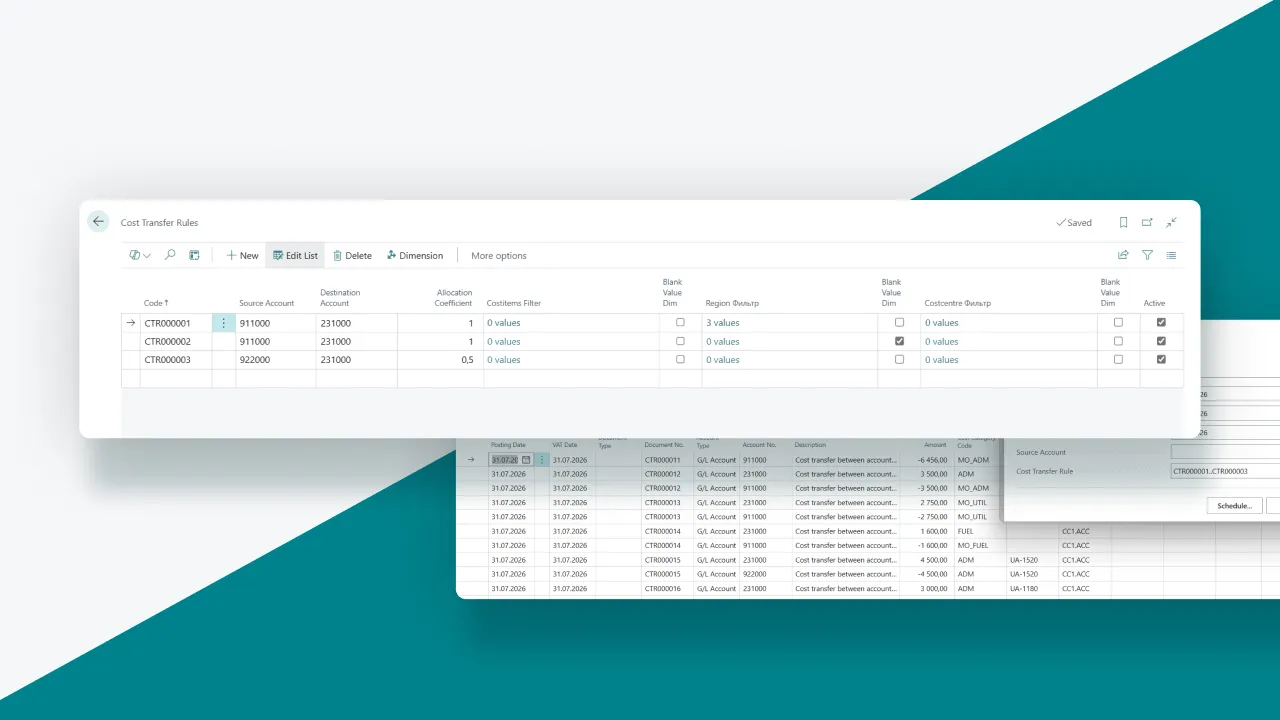
Example of configuring rules for transferring costs between accounts:
Benefits
- Reduced production period-end closing time.
- Minimized errors caused by manual entry creation.
- Full preservation of analytical accounting by dimensions.
- Flexible configuration of transfer rules without changing business processes.
- Preparation of data for subsequent automated cost allocation.
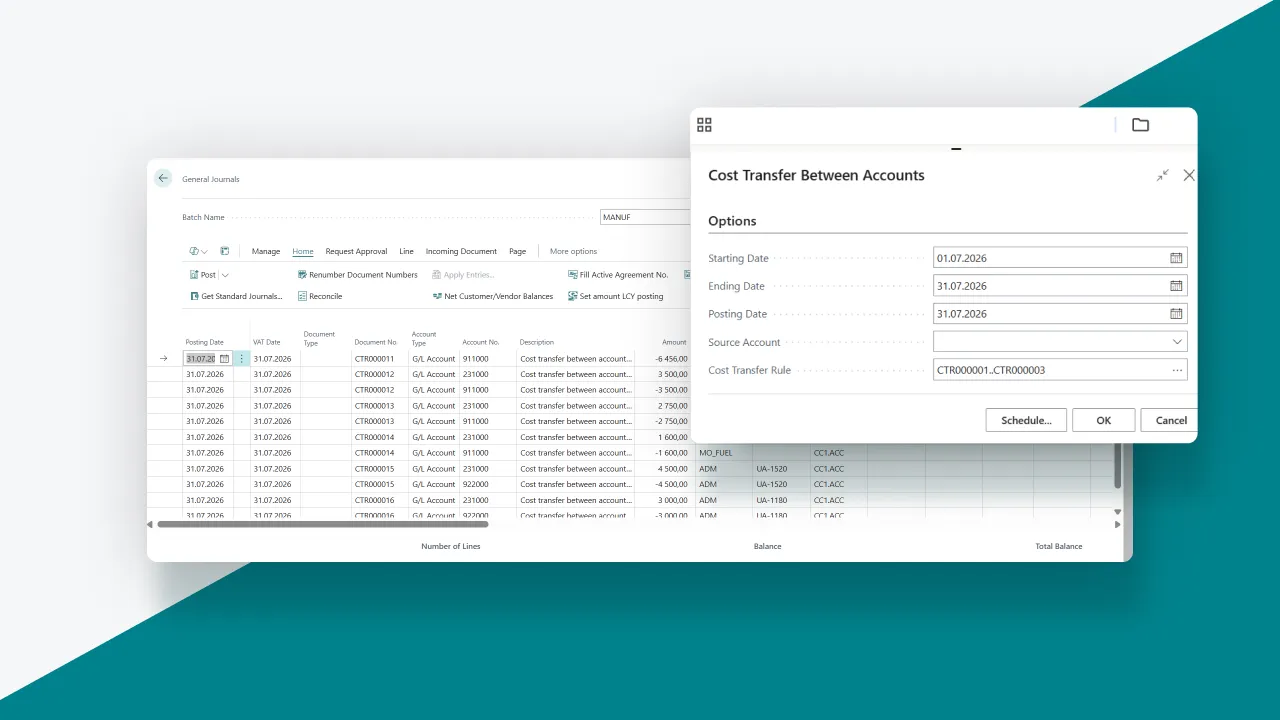
Example of running the function to transfer account balances according to the active rules:
Cost Allocation
SMART Cost Allocation automates the allocation of direct and general overhead costs between finished goods and work in progress in accordance with corporate costing policies. This improves the accuracy of actual cost calculation and enables a consistent calculation methodology across all production units.
Features
- Configuration of allocation rules by cost item.
- Support for different allocation bases, including labor hours, machine hours, payroll costs, production volume, material costs, and standard indicators.
- Automatic determination of allocation bases based on Business Central data.
- Allocation of costs between finished goods and work in progress.
- Creation of an allocation document with calculated coefficients and amounts.
- Automatic creation of value entries similar to the Item Revaluation Journal.
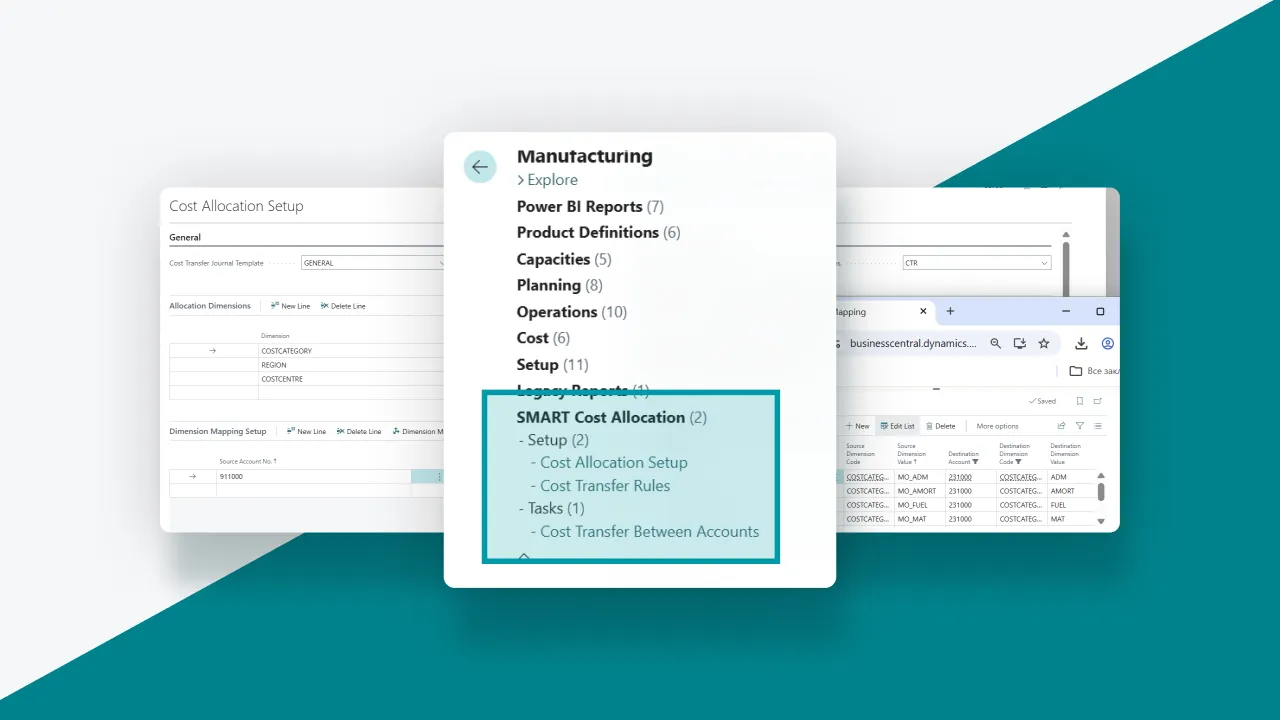
Example of configuring general overhead cost allocation rules:
Benefits
- Accurate calculation of actual production costs.
- A consistent cost allocation methodology across all production areas.
- Reduced calculation effort and elimination of manual errors.
- Support for both actual and standard allocation bases.
- Transparent calculations and the ability to audit every stage of the cost calculation process.
- Scalability for companies with complex production structures.
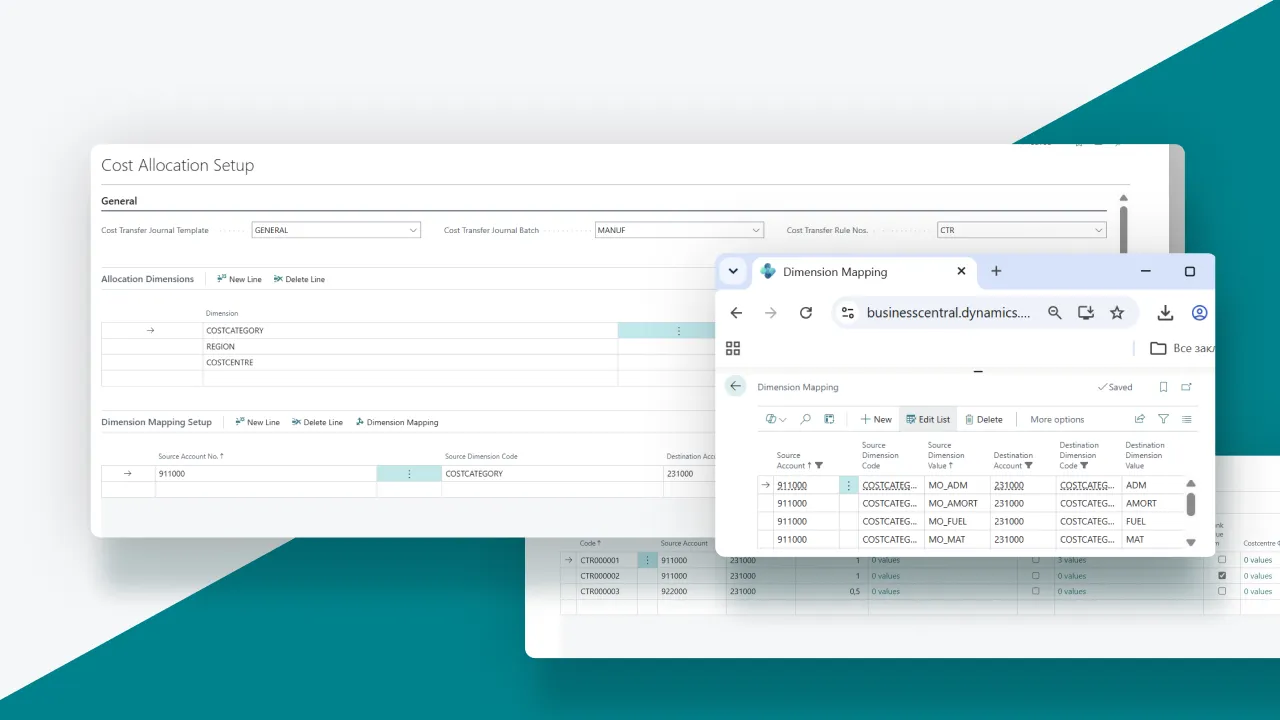
Example of creating a cost allocation document and revaluing item costs according to defined rules by costing item:
Why choose SMART Cost Allocation: Business benefits of implementing the solution
SMART Cost Allocation provides comprehensive automation of the production cost calculation process in Microsoft Dynamics 365 Business Central, from accumulating and transferring general overhead costs to their final allocation between finished goods, work, services, and work in progress (WIP).
Implementing the module provides manufacturers with the following benefits:
- Automation of labor-intensive production period-end closing and cost calculation operations.
- Preservation of complete analytical data and dimensions at every stage of cost processing.
- Configuration of transfer and allocation rules according to the company’s specific requirements.
- Support for different allocation bases, including labor hours, machine hours, payroll costs, production volume, material costs, and standard indicators.
- Accurate and transparent calculation of actual costs for finished goods, work, and services.
- Reduced risk of errors associated with manually entering entries and performing calculations.
- Accurate accounting for work in progress and accumulated production costs.
- Improved financial and management reporting through detailed cost analysis by dimension.
- Ability to audit and control every stage of the cost calculation process.
- Scalability for companies with complex production structures, multidimensional analytics, and a large number of costing rules.
If your company uses Microsoft Dynamics 365 Business Central for production and management accounting and needs to automate the transfer and allocation of production costs according to its own costing methodology, SMART Cost Allocation can be a reliable solution.
SMART Cost Allocation is now available for implementation:
Microsoft Marketplace | cloud solutions, AI apps, and agents
Have additional questions? Book a consultation with our experts: